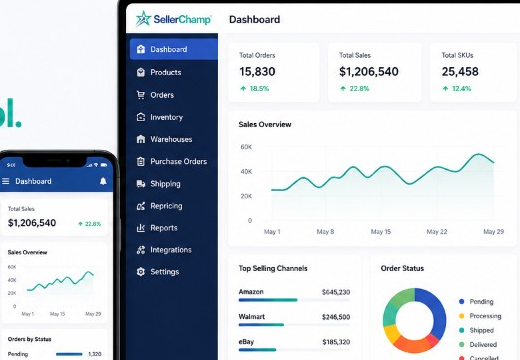
A discounted online shipping label from SellerChamp can save your business real money every time you ship. Why pay full price when you can get the same label for less?
SellerChamp makes it easy — just click, print, and ship.
You’ll save time, cut costs, and keep every order running smoothly. Let’s break down how it works and how you can start saving right now.
Try SellerChamp for Yourself!
Schedule a demo today and discover how our Bulk Lister can help you list more products, increase sales, and grow your e-commerce business faster than ever.

Why Discounted Online Shipping Labels Even Matter
Let me say it plainly: shipping is one of the biggest margin killers for small sellers. Carriers raise rates. Dimensional weight fees creep in. Zone surcharges surprise you.
Yet customers hate paying for shipping.
- 48% of shoppers will abandon a cart because of extra shipping costs.
- Most consumers (over 90%) will cancel a purchase if shipping is expensive.
Platforms like Easyship claim you can save “up to 91%” via discounted rates.
ShipRush advertises up to 89% off USPS and 85% off UPS via their shipping discount programs.
But those tools often feel like add-ons. SellerChamp puts the discounted label capability inside your order workflow.
How Discounted Online Shipping Labels Actually Work
To understand what you’re getting, here’s the model:
- Shipping platforms or aggregators negotiate volume-based discounted rates with carriers. (Carriers offer better pricing for bulk shipping)
- Those platforms (or software partners) pool demand across many sellers.
- They pass those savings to you by letting you buy labels at those reduced rates.
- You still get full label functionality — barcode, tracking, address, and payment.
You Might Also Like: 33 Proven eCommerce Growth Hacks for Long-Term Success
What SellerChamp Gives You (and why it’s better than just using a discount tool)
This is where SellerChamp stands out. Many tools let you generate discounted labels, but it weaves it into your eCommerce operations.
Here’s what SellerChamp offers:
- Up to 85% savings on shipping labels (as per its product pages) via integrated discounted shipping services.
- Multi-channel integration — connect Amazon, Shopify, eBay, etc., and manage everything from one dashboard.
- Auto-printing and label workflows — you can auto-print, auto-submit, and batch labels.
- Rule-based shipping logic — choose workflows: “cheapest acceptable,” zone-based logic, fallback carriers.
- Shipping info & tracking syncing — no manual entry.
- Support for domestic and international labels (so your discounted online shipping label works for cross-border too).
Tips to Maximize Every Online Shipping Label
You want not just discounted labels, but optimal discounted labels:
1. Use automation & rules
Let SellerChamp pick the cheapest acceptable carrier for you. Don’t choose manually every time.
2. Watch dimensional weight (DIM)
Use the smallest box that fits. If you leave a lot of empty space, carriers will charge based on box size, not just weight.
3. Batch label printing
Printing individually is slow. Do 20, 50, 100 labels in one go.
4. Link your own carrier accounts
If you have UPS or FedEx negotiated accounts, link them. SellerChamp will compare those vs its discounted rates and pick the lower.
5. Audit your label costs monthly
Export your labels, compare your average cost per label against past months, and spot anomalies.
6. Be aware of exceptions
Some services (express, freight, special contracts) may not give you deep discounts. Always compare.
7. Offer free shipping thresholds
Because your label costs are lower, you can absorb them better when you give “free shipping” above a certain cart value.
Why SellerChamp vs Just Using a Discount Tool
Many sellers think, “Why not just use Shippo, Pirate Ship, or Easyship for discounted labels?” That’s fair — those tools are good. But here’s where SellerChamp wins:
- It’s built into your listing, order, and shipping workflow — you don’t jump between systems.
- No subscription fee for shipping labels. You only pay for the labels you print.
- Full operational control: print labels in bulk, combine orders going to the same address, auto-calculate package weight, and create pick sets to streamline order picking.
- Supports multi-channel, multi-marketplace sellers in a way most discount-only tools don’t.
- You get not only discounted online shipping labels but also inventory sync, repricing, and order automation, all in one platform.
- And you still get the savings you expect (up to 85%), without the extra steps.
- It supports multi-channel, multi-marketplace sellers in a way most discount-only tools don’t.
- You get not only discounted online shipping labels but inventory sync, repricing, order automation, etc., in one platform.
- And you still get the savings you expect (up to 85%), but without extraneous steps.
In short, you get all the benefits of a discount tool plus a full operations system.
How to Start Printing Your Discounted Online Shipping Label with SellerChamp
Here’s your play-by-play:
- Sign up for SellerChamp (or request a demo).
- Connect your marketplaces (Amazon, Shopify, Walmart, eBay).
- Set up your package profiles (dimensions, weights).
- Decide your shipping logic (e.g., “cheapest carrier under $X”).
- On each order, click Create Shipping Label.
- Let the system choose a discounted label or let you pick.
- Print, ship, track — all from within SellerChamp.
Try SellerChamp Demo
Ready to cut your shipping costs in half?
Request a SellerChamp demo today and see how discounted online shipping labels can save you time and money instantly.